You don't need to memorize TCP flags. You just need to click on the red things. ExaViewer, part of the Vantage Platform, delivers multi-user, remote-first, petabyte-scale packet analysis with web and terminal interfaces.
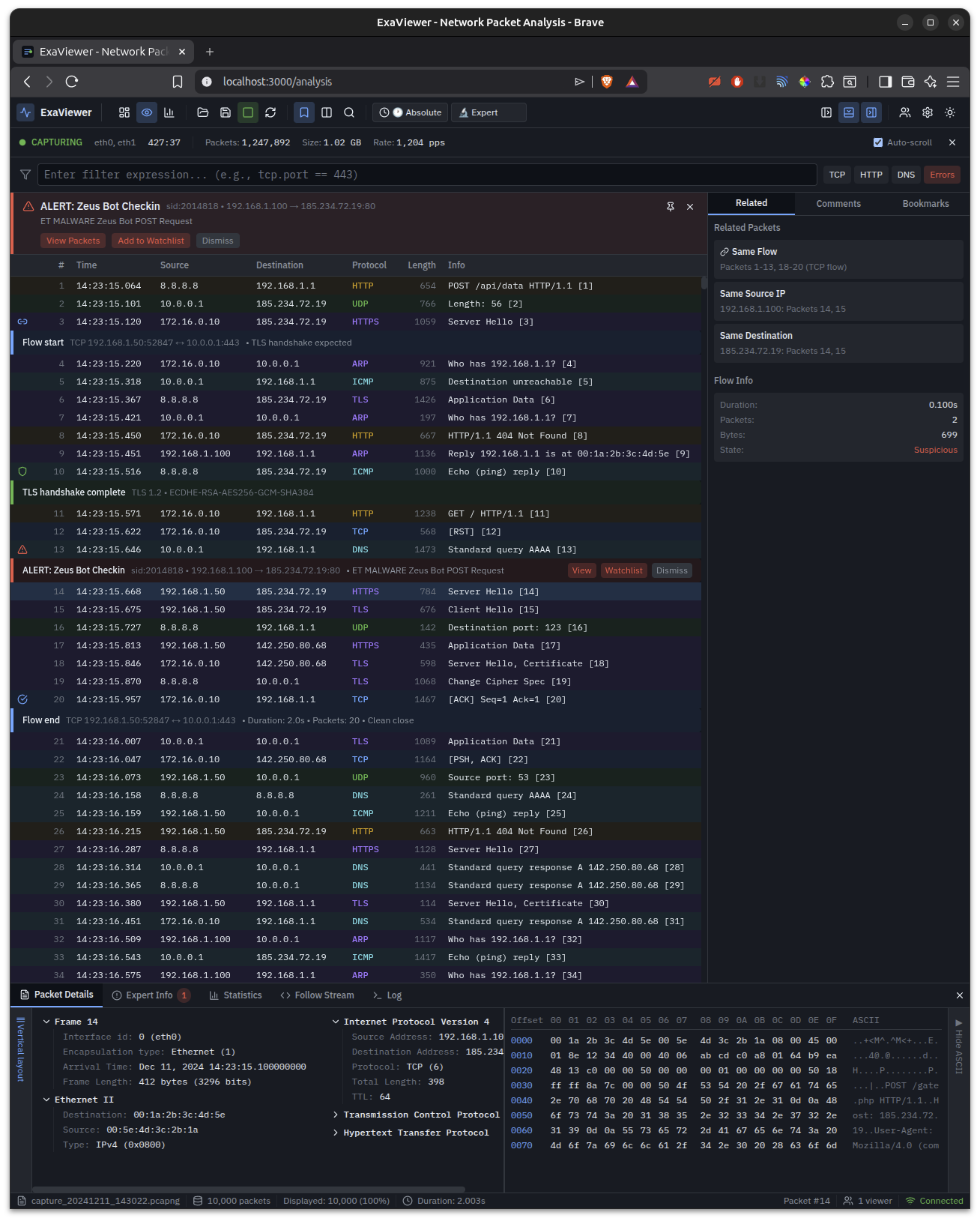
Packet analysis with inline IDS alerts, flow markers, bookmarks, and hex dump. Detecting Zeus Bot C2 communication in real-time.
Fleet dashboard with server discovery, capture management, performance metrics, and integrated Suricata/Zeek services.
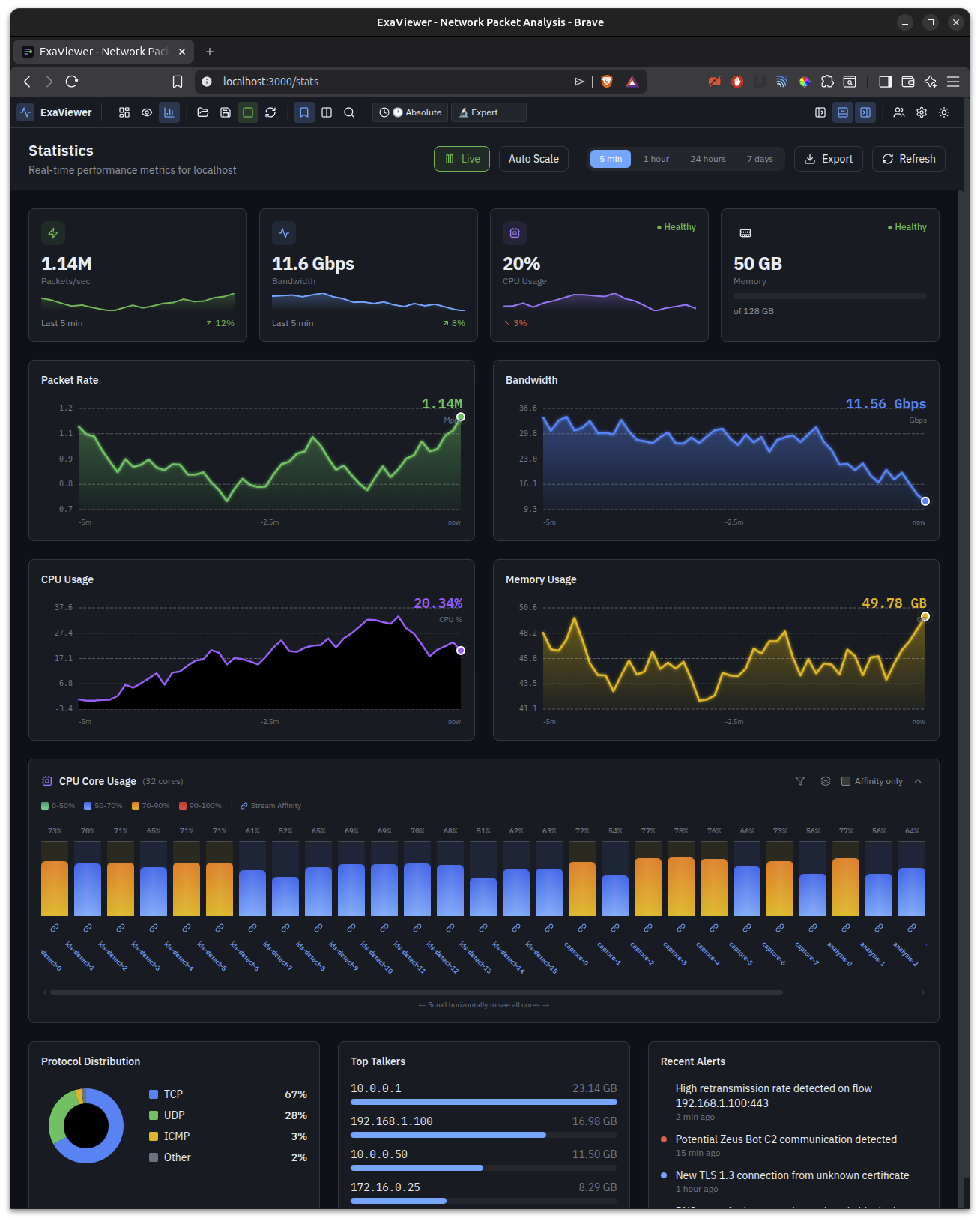
Live performance monitoring — packet rate, bandwidth, per-core CPU, protocol distribution, top talkers, and recent alerts.
ExaViewer, part of the Vantage Platform, isn't a Wireshark clone. It's a fundamentally different approach to understanding network traffic.
| Capability | ExaViewer | Wireshark | CloudShark |
|---|---|---|---|
| Multi-petabyte files | Native support | RAM-limited | Upload limited |
| Multi-user collaboration | Real-time shared sessions | Single user only | Basic sharing |
| Security levels | 0–20, field-level | None | None |
| Architecture | Remote-first, data stays on server | Local only | Upload required |
| Live capture | File-backed, unlimited | Memory-limited | Not supported |
| Problem detection | Automatic, inline alerts | Manual hunting | Limited |
| Terminal interface | Full TUI via SSH | tshark (text only) | None |
| Vantage integration | Same security model | N/A | N/A |
Suricata and Zeek alerts appear directly in the packet list. Color-coded severity, clickable rules, and context.
Flow start, TLS handshake, and flow end markers inject automatically between packets. See the story of every connection.
Bookmark packets of interest with color-coded labels. Shared across all analysts viewing the same capture.
Canvas-rendered packet list handles millions of rows at 60 fps. No lag at any scale. Level-of-detail adaptive display.
Expert mode shows raw protocol fields. Friendly mode explains what happened in plain English. Toggle per-packet or globally.
Dashboard discovers ExaCapture servers on your network. See all captures, services, and performance from one place — integrated with the Vantage Platform.
Four deployment modes covering every scenario from development to classified environments — all powered by the Vantage Platform security model.
Open capture files on your own machine. No server needed. Security level 0 with no enforcement overhead. Full performance. Five-minute setup.
Multiple analysts, shared captures, central key management. Security levels 1–12. Audit logging. Connect to ExaCapture servers across your network.
Reach capture infrastructure through SSH tunnels. Authentication package-based security. Levels 1–17. Offline grace periods for intermittent connectivity.
Physical authentication via USB or hardware token. Security levels 18–20. Two-person integrity controls. Designed for the most sensitive environments.
ExaViewer works in three modes: full web UI, terminal TUI, and CLI pipe mode. Every capability is accessible from the command line.
Connect to remote ExaCapture servers with SSH-style syntax. Pipe output to grep, custom scripts, or other tools in your workflow.
# Open local capture file $ exaviewer /path/to/capture.pcapng # Connect to remote ExaCapture server $ exaviewer [email protected]:incident-1217 # Terminal TUI mode (ncurses) $ exaviewer --terminal capture.cap # Pipe mode for scripting $ exaviewer --dump capture.cap | grep "POST /gate.php" $ exaviewer --pipe capture.cap | ./detect-c2.sh
Schedule a demo or download ExaViewer to get started.